Your new hire just sent you a Slack DM: “I don’t know anyone outside my team. Should I just… randomly message people?”
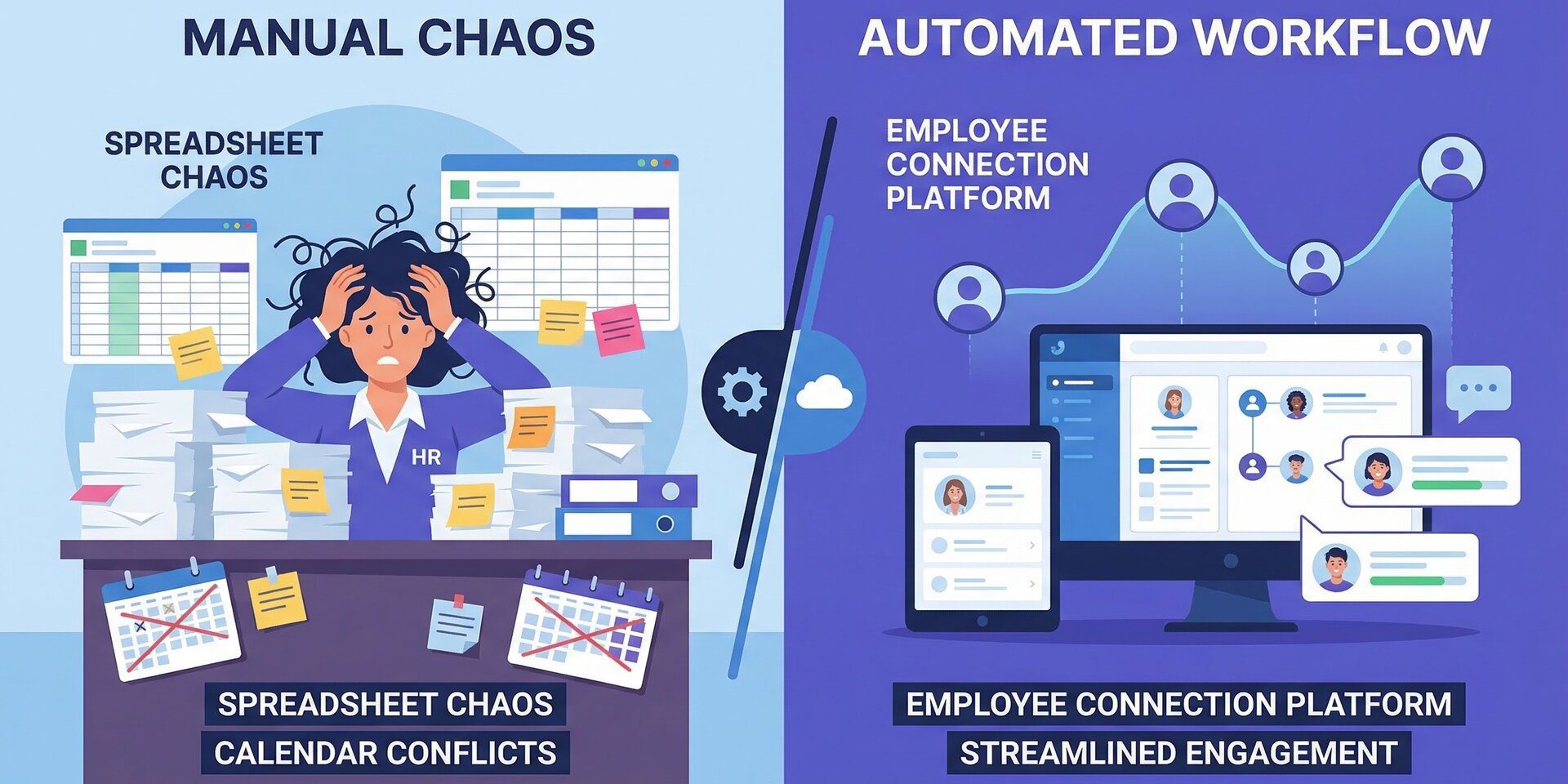
You’ve been there. Remote onboarding is hard. Your HR team is stretched thin. You need an automated virtual coffee chat program, but you don’t have 10 hours a week to manage spreadsheets and calendar invites.
So you Google “employee coffee app” and find 20+ options. Donut. CoffeePals. Random Coffee. Icebreaker. LEAD.bot.
Which one actually works? And more importantly: which one won’t add another full-time job to your plate?
Let’s cut through the marketing fluff. Here’s what you need to know before you buy.
The Market Reality: 20,000+ Companies Are Already Doing This
Employee connection platforms aren’t experimental anymore. Over 20,000 companies use Donut alone (the largest player in this space). Buffer, Ontra, Axios, and Flatiron Health are all running structured virtual coffee programs.
Why? Because the data is clear:
- 82% higher retention with buddy programs (SHRM, 2024)
- 70% productivity increase when new hires have structured connections (Gallup, 2025)
- 80% reduction in HR rework with automated onboarding (HR Tech Report, 2025)
But here’s the problem: most tools require constant management. And most HR teams don’t have that bandwidth.
What You’re Actually Buying: 3 Core Features
All employee connection platforms promise “automated coffee chats.” But that’s like saying all cars have wheels. What matters is how they match, what they measure, and how much admin time they require.
1. Matching Logic (Random vs Smart)
Random matching (Donut, CoffeePals, Random Coffee):
- Pairs people at random
- Works for casual watercooler vibes
- Doesn’t optimize for business outcomes (onboarding, mentorship, knowledge transfer)
Smart matching (LEAD.bot Standard Plan+):
- Uses role, team, skills, and goals data
- Matches serve specific purposes (new hire → subject matter expert, mentor → mentee)
- Optimizes for structured programs, not just “coffee vibes”
The difference: Random matching is fine if you just want social connection. Smart matching is better if you’re solving specific HR problems (onboarding churn, knowledge silos, cross-team collaboration).
2. Measurement (Activity vs Outcomes)
Activity metrics (most tools):
- “500 matches made this month!”
- “85% participation rate!”
- Great for reporting to leadership, but doesn’t prove ROI
Outcome metrics (LEAD.bot Standard Plan+):
- Willingness to connect insights (Standard Plan: light-weighted behavioral signals; Premium: detailed analytics)
- Churn risk detection (flags disengaged employees before they quit)
- Knowledge network mapping (identifies who knows what across the org)
- Silent Quitter detection (spots at-risk employees based on behavioral patterns)
- Company-wide behavioral analytics (benchmarks against 2,000+ companies)
The difference: Activity metrics tell you what happened. Outcome metrics tell you if it’s working and where to intervene.
3. Admin Time Required (5 Minutes vs 10 Hours Per Month)
This is the hidden cost nobody talks about.
Manual coordination (no tool):
- 10-15 hours per month
- Spreadsheets, calendar invites, reminders, follow-ups
- Dies after 3 months when HR gets busy
Basic automation (most tools):
- 2-5 hours per month
- Still requires manual participant management, schedule tweaks, report generation
Full automation (LEAD.bot Standard Plan+):
- 5 minutes per month (after 10-minute initial setup)
- Matching, invitations, calendar integration, reminders, surveys, reports = all automatic
- “Set and forget” – runs indefinitely without constant oversight
The difference: If your HR team is already stretched thin, choose the tool that requires the least ongoing management. Budget for the hidden cost of your time.
Pricing Benchmarks: What You’ll Actually Pay
Let’s talk numbers. Here’s what employee connection platforms cost as of March 2026:
Donut (Slack-focused):
- $74-119/month
- Most popular tool (2,000+ customers)
- Random matching only
- No ONA features
CoffeePals (Teams-only):
- $49/month
- Microsoft Teams exclusive
- Basic matching + surveys
- No advanced analytics
LEAD.bot (Slack + Teams):
- Free Plan: $0/mo (up to 24 users, 1 year free)
- Standard Plan: Starting from $49/mo (annual subscription with 17% discount) or subscribe monthly without the annual discount; scales with company size (25-100+ users, unlimited matching channels, light-weighted behavioral insights)
- Engagement Plan: Starting from $99/mo (adds onboarding templates, churn risk reports)
- Premium Plan: Custom pricing (500+ employees, includes advanced ONA + detailed behavioral analytics)
Quick math: If you’re paying $99/mo for LEAD.bot and it saves your HR team 10 hours per month, that’s $1,200+ in saved labor (assuming $120/hour fully loaded HR cost). ROI = 12x.
The LEAD.bot Advantage: What You Get That Others Don’t Offer
After reviewing 20+ employee connection platforms, here’s what makes LEAD.bot Standard Plan different:
1. Dual-Platform Support (Slack + Teams)
- Most tools force you to pick one (Donut = Slack-first, CoffeePals = Teams-only)
- LEAD.bot works natively in both Slack AND Microsoft Teams (as separate instances – each platform runs independently)
- Matters if you have Slack for some teams, Teams for others (common in M&A or enterprise environments)
- Note: Slack and Teams instances do not cross-message; users are matched only within their own platform
2. Smart Matching (Standard Plan+)
- Uses role, team, skills, and goals data
- Matches serve specific purposes (new hire → subject matter expert, mentor → mentee)
- Competitive advantage: Donut and CoffeePals only offer random matching
3. Willingness to Connect Insights (Standard Plan+)
- Standard Plan: Light-weighted behavioral signals (measures engagement patterns, participation trends)
- Premium Plan (500+ employees): Detailed behavioral analytics (benchmarks your org culture against 2,000+ companies, real-time dashboards)
- Use case: Spot cultural issues and engagement patterns early
4. Individual Post-Matching Surveys (vs Group Surveys)
How competitors do it (Donut, CoffeePals):
- Send surveys to THE GROUP after a match
- Both people see each other’s responses
- Creates social pressure → less honest feedback
- People hesitate to report issues when their match can see their answer
How LEAD.bot does it:
- Sends surveys to EACH PERSON INDIVIDUALLY after each match
- Anonymous to the other person: Your match never sees your response
- Aggregated for admins: HR sees trends and insights across all matches, not individual responses
- Used for personalized matching: The bot knows each person’s real feeling and uses it to improve future matches for that specific person
Why it matters:
- More honest feedback: No social pressure when responses are private
- Better data quality: People report real experiences, not polite responses
- Smarter matching over time: Bot learns individual preferences and optimizes future pairings
- Protects psychological safety: Employees feel safe giving candid feedback
Result: Higher quality connection data, better program optimization, continuous improvement in match quality
5. Enterprise-Grade Governance
- GDPR compliant, US-EU Privacy Shield certified
- Audit trails for compliance teams
- Suitable for regulated industries (finance, healthcare, government contractors)
6. 5 Minutes Per Month Admin Time
- Fully automated after 10-minute setup
- No manual matching, no spreadsheets, no calendar juggling
- Perfect for busy HR teams who want results without constant oversight
Premium Plan (Enterprise Add-On for 500+ Employees)
For organizations with 500+ employees, LEAD.bot offers advanced enterprise features:
Advanced Organizational Network Analysis (ONA)
- Maps informal knowledge networks (who knows what, who influences whom)
- Identifies subject matter experts automatically
- Detects silent quitters before they resign
- Measures operational inefficiencies (e.g., “Why is Marketing always waiting on Engineering?”)
Ivy League Research-Backed Behavioral Analytics
- Analyzes company-wide LEAD.bot response behaviors
- Detailed willingness to connect analytics (vs light-weighted insights in Standard Plan)
- Benchmarks your org culture against 2,000+ companies (anonymized data)
- Real-time dashboard: see how your engagement trends compare to industry peers
- Use case: Spot cultural issues before they escalate, optimize cross-team collaboration at scale
Premium is custom pricing – designed for enterprise environments where advanced behavioral analytics drive strategic HR decisions.
Buyer’s Checklist: 7 Questions to Ask Before You Buy
Use this framework to evaluate any employee connection platform:
✅ 1. Does it work in our chat tool (Slack, Teams, or both)?
- If you use Teams: CoffeePals or LEAD.bot
- If you use Slack: Donut or LEAD.bot
- If you use both: LEAD.bot only
✅ 2. What’s the real admin time required?
- Ask: “How many hours per month will this take after setup?”
- Look for: Automated schedules, calendar integration, auto-reminders, auto-surveys
✅ 3. Does it match randomly or intelligently?
- Random = fine for casual watercooler vibes
- Smart = better for structured programs (onboarding, mentorship, knowledge transfer)
✅ 4. Can I measure outcomes (not just activity)?
- Activity metrics: “500 matches made”
- Outcome metrics: “Churn risk detection, knowledge network mapping, behavioral benchmarking”
✅ 5. Does it support structured programs (onboarding, mentorship, M&A)?
- Look for: Pre-built templates, manager check-ins, 30/60/90-day milestones
- Avoid: Tools that only do “random coffee chats”
✅ 6. What’s the total cost (subscription + hidden labor)?
- Calculate: Tool cost + (HR hours per month × fully loaded hourly rate)
- Example: $99/mo tool + 10 hours/mo × $120/hr = $1,299/mo total cost
- LEAD.bot at $99/mo + 5 min/mo = $109/mo total cost (12x cheaper)
✅ 7. Does it scale with us (200 → 2,000+ employees)?
- Check: Pricing tiers, feature limits, admin seat caps
- LEAD.bot: Works for 200-5,000+ employees with same admin effort
Real-World Use Cases: Who’s Using These Tools (And Why)
Scenario 1: Remote Onboarding (200-500 Employees)
Problem: New hires feel isolated, churn in first 90 days
Solution: LEAD.bot Standard or Engagement Plan (starting from $49/mo)
Features: Smart matching, buddy programs, manager check-ins, light-weighted behavioral insights
ROI: 82% higher retention, 70% productivity increase
Admin time: 5 minutes per month
Scenario 2: Hybrid Team Culture (500-1,000 Employees)
Problem: Office vs remote divide, knowledge silos across departments
Solution: LEAD.bot Standard Plan ($399/mo) + structured cross-team matching
Features: Cross-team matching, watercooler topics, pulse surveys, light-weighted behavioral insights
ROI: Improved collaboration, reduced isolation
Admin time: 5 minutes per month
Scenario 3: Enterprise Knowledge Management (2,000-5,000 Employees)
Problem: “Who knows X?” questions slow down projects, SME bottlenecks, cultural scaling issues
Solution: LEAD.bot Premium Plan (custom pricing, requires 500+ employees)
Features: Advanced ONA, SME Finder, knowledge network mapping, detailed behavioral analytics, real-time benchmarking
ROI: Faster problem-solving, reduced redundant work, proactive retention, strategic culture insights
Admin time: 5 minutes per month + quarterly ONA consultation
What HR Teams Get Wrong When Choosing Tools
❌ Mistake 1: Choosing the cheapest tool without calculating hidden labor costs
- $49/mo tool that requires 10 hours/mo = $1,249/mo total cost
- $99/mo tool that requires 5 min/mo = $109/mo total cost
- Lesson: Budget for your time, not just subscription cost
❌ Mistake 2: Picking random matching when you need structured programs
- Random matching = fine for casual connection
- Smart matching (LEAD.bot Standard+) = better for onboarding, mentorship, knowledge transfer
- Lesson: Match the tool to your use case
❌ Mistake 3: Ignoring measurement (activity vs outcomes)
- “500 matches made” sounds good in a report
- “Churn risk detected 30 days before resignation” saves you $50K+ in recruiting costs
- Lesson: Choose tools that measure what matters (behavioral insights available in LEAD.bot Standard Plan)
❌ Mistake 4: Not testing with a pilot program first
- Roll out to 50-100 people before company-wide deployment
- Measure: participation rate, feedback quality, admin time required
- Adjust: schedules, matching logic, communication templates
- Lesson: Test small, iterate fast, scale when proven
The Bottom Line: What to Do Next
If you’re choosing an employee connection platform in 2026, here’s the decision tree:
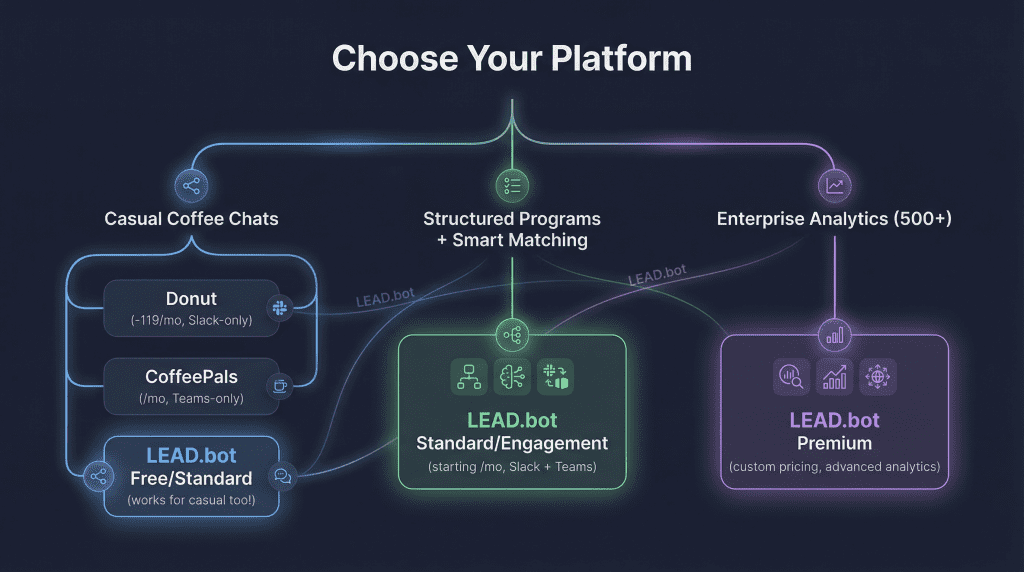
If you’re not sure:
→ Start with LEAD.bot Free Plan ($0/mo, up to 24 users, 1 year free) and test for 30 days
Try LEAD.bot Free (No Credit Card Required)
- Free Plan: $0/mo, up to 24 users, 1 year free
- 5-minute setup: Works in Slack or Microsoft Teams
- No manual matching: Set once, runs automatically
- ROI proof: Track participation, feedback, and connection quality
Start your free trial: lead.app
About LEAD.bot:
LEAD.bot is a smart employee connection platform for Slack and Microsoft Teams. We help 200-5,000+ employee organizations run automated onboarding, mentorship, and virtual coffee programs with 5 minutes of admin time per month. Learn more at lead.app.
Further Reading: